NodePort vs ClusterIP
kubectl expose deployment nginx --port=80 --type=NodePort
kubectl expose deployment nginx --port=80 --type=ClusterIP
ClusterIP (Default)
kubectl expose deployment nginx
\
--port=80 \
--type=ClusterIP
Accessible from
✅ Pods inside the cluster
❌ Host machine
❌ Your laptop
❌ Internet
Architecture:
Pod A
│
│
nginx-service
10.96.85.101
│
│
nginx Pod
The service gets a virtual IP (ClusterIP).
Example:
kubectl get svc
NAME TYPE
CLUSTER-IP PORT
nginx-service ClusterIP 10.96.85.101 80
Pods communicate using
http://nginx-service
or
http://10.96.85.101
NodePort
kubectl expose deployment nginx
\
--port=80 \
--type=NodePort
Accessible from
✅ Pods
✅ Kubernetes nodes
✅ Host
✅ Other computers (if routing/firewall permits)
Architecture
Browser
│
│
192.168.100.10:32180
│
NodePort Service
│
│
nginx Pod
Example
kubectl get svc
NAME TYPE
CLUSTER-IP PORT(S)
nginx-service NodePort 10.96.85.101 80:32180/TCP
Here
32180
is automatically allocated.
Access it:
http://192.168.100.10:32180
Visual Comparison
ClusterIP
Internet
X
Host
X
----------------------------
Kubernetes Cluster
Pod ---- Service ---- Pod
Only internal communication.
NodePort
Internet
│
│
Host
│
│
Node:32180
│
│
Service
│
│
Pods
The service is exposed on every Kubernetes node.
In your LXD lab
Suppose
k8master
192.168.100.10
k8worker1
192.168.100.11
NodePort
80:32180
You can access
http://192.168.100.10:32180
or
http://192.168.100.11:32180
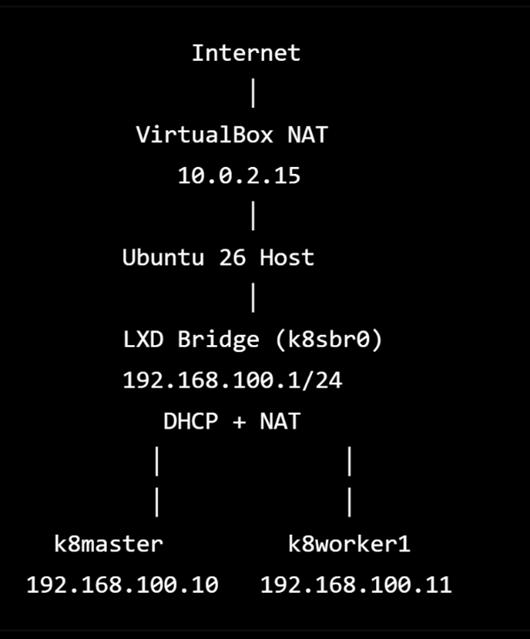
Create LXD in Ubunut 26 to train kubernetes from scratch
Create a preseed for initializing LXD (storage pool, bridge, default profile).
• Ubuntu 26.04 (latest)
• LXD 5.21 LTS (Snap) (latest)
• Kubernetes 1.33.x (latest)
Storage Pool
-------------
default
Bridge
------
k8sbr0
Profile
-------
k8s-base
Containers
----------
k8master
k8worker1
we'll build LXD properly from scratch with:
• Clean LXD initialization.
• ZFS storage pool.
• k8sbr0 bridge.
• DHCP reservations.
• Static container IPs.
• The reusable k8s-base profile.
• Creation of k8master and k8worker1.
• One reusable profile (k8s-base).
• One bridge (k8sbr0).
• One storage pool (default).
• One common node installation script.
• One rebuild script.
• One validation script.
• Snapshots after each major milestone.